01 / Prepare
See what the day needs.
Bring lesson instructions, supplies, and starting points together across subjects and children. Save and approve lessons, with dates when they help.
 Calculated Labs
Verrow TA · In active development
Verrow TA is being built to help parents turn the curriculum they choose into manageable daily learning. It brings lesson preparation, teaching guidance, and useful records together, with the parent remaining the educator and decision-maker.
Development now includes a working Parent Assistant and the core workflows for a Student Assistant, connecting preparation with activities the parent approves.
In active development. Not yet available for public use.
Inside the working Parent Assistant
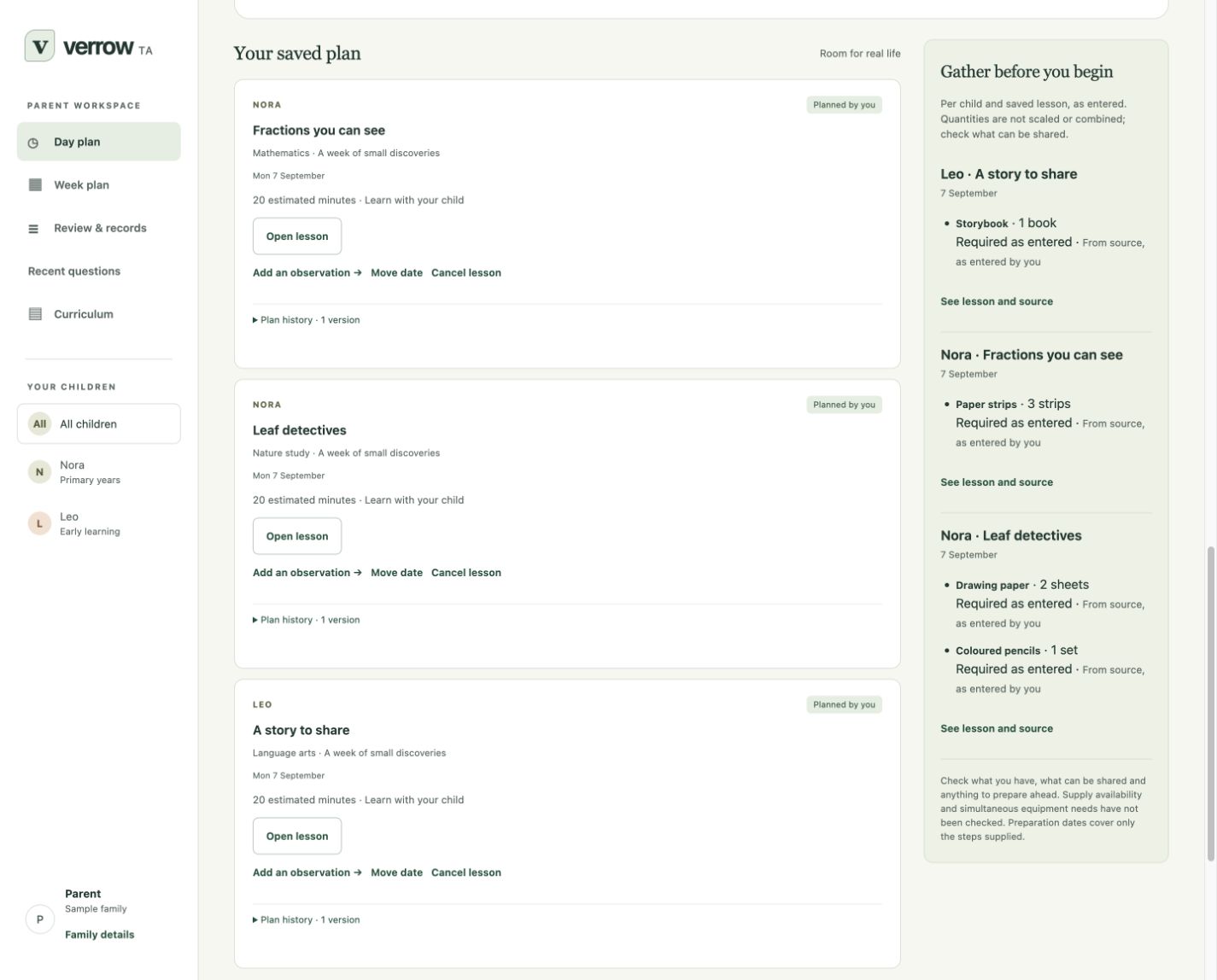
Prepare with purpose.
Leave room for real life.
Our north star
Help parents turn the curriculum they choose into manageable daily learning, with guidance suited to each child, a clear record of what happened, and the parent informed and in control.
Parent Assistant and Student Assistant are the two sides of TA. Learning Together is the shared stage connecting them through one family plan and teaching record. The parent decides how each child takes part.
Parent Assistant · Working in development
The Parent Assistant brings curriculum materials, approved lessons, preparation, and teaching records into one workspace. It supports the adult’s teaching, including when a child learns entirely through books, paper, conversation, and practical activities.
Live teaching help has now been demonstrated in the installed Mac app, including saving an answer and reopening it offline. The aim is to help parents understand the lesson, consider an explanation, and decide how best to support their child.
01 / Prepare
Bring lesson instructions, supplies, and starting points together across subjects and children. Save and approve lessons, with dates when they help.
02 / Teach
Clarify the idea for yourself, work through an example, or explore another way to teach it. Use the selected lesson and your feedback about what you tried to find a useful next step.
03 / Continue
Record a finish or a pause, with an optional note. Keep each child’s course position, unfinished work, and next steps close to the lesson.
04 / Review
Review, correct, and export teaching records. See what was reported, which lesson it belongs to, and what you want to revisit.
Learning Together · Working foundations in place
Learning Together connects parent preparation with the child’s approved activity. The parent chooses what to share and how the child takes part, with room for learning alongside an adult and working more independently.
The development app includes approved activities, a separate student workspace, saved work, and a return to the parent for help. Parent teaching guidance remains separate from the student’s view, while records distinguish the learner’s work and the assistance received.
Review the child’s instructions separately. Parent coaching, teacher answers, private notes, and sibling information stay in the parent view.
The development app lets a child read the approved instructions and save their own words. Returning to the parent workspace requires parent sign-in.
Parent review distinguishes a student’s entry, words transcribed by a parent, and reported help. Corrections preserve the original account.
Student Assistant · In active development
The Student Assistant is being developed for learners ready to work directly with TA. It brings together a clear task, space for the student’s own work, questions, breaks, and parent involvement within the learning day the parent approves.
These core workflows are implemented in the development app. Guided tutoring is being developed around the chosen lesson, with an emphasis on helping learners think, explain, and retain ownership of their work.
The parent remains responsible for decisions about understanding, further practice, and readiness to move on.
See the latest development progress.
An illustration of the planned experience
You prepare a story lesson for one child and fractions for another. One learns beside you; the other follows an approved activity with TA’s support. A practical lesson brings learning away from the screen.
If a child gets stuck, the request for your help includes the difficulty and support already offered. An interruption leaves a place to return. At the end of the day, you review the work, help received, and unfinished tasks to decide where tomorrow begins.
Open the current approved activity with its relevant material and a clear starting point. Move forward within the sequence you have chosen.
Ask questions, explain an attempt, and receive guidance suited to the lesson. The student’s reasoning and writing remain their own.
Move between subjects, breaks, paper work, and practical activities. Return to the recorded activity after an interruption, with unfinished work still visible.
Ask for help with useful context. Activities needing an adult wait, or offer an alternative you have approved.
Review the work, assistance, and open questions. You make the final judgment about understanding, further practice, and readiness to move on.
For curriculum providers
The goal is to carry your curriculum’s purpose, instructions, and sequence from parent preparation through student activity and review.
Families can bring together purchased, free, and parent-created material. Prepared teaching packs from curriculum providers are a later part of the roadmap.
Talk about your curriculumDevelopment update · 16 October 2026
Verrow TA now has an installed Mac development app that brings curriculum materials, lesson planning, teaching records, and the core Parent and Student workflows together.
The Parent Assistant supports curriculum materials and source references, lesson approval, preparation across children and subjects, observations, and exports. Saved work and course positions provide a place to return after an interruption.
In a reviewed demonstration, the installed app answered a parent’s lesson question, saved the response, and reopened it offline. This is an important step in connecting lesson preparation with teaching support.
Approved activities, questions, student work, breaks, and requests for parent help are implemented in the development build. These provide the foundation for guided learning with the parent informed and in control.
The development app stores family records locally in an encrypted workspace and includes backup and recovery capabilities.
Development and testing continue as we bring the complete Parent and Student experience together and prepare TA for wider use.
TA remains in development and is not yet available for public use. A release date has not been announced.
A few practical questions
TA is currently being developed and tested in a working Mac app. Parent preparation and records, demonstrated live Parent teaching help, and core Student workflows are already in place. Public availability will follow further development and testing.
We welcome conversations with families, educators, and curriculum providers as the work progresses.
Family records are stored locally in an encrypted workspace. New AI answers use an online teaching service and an external AI provider, receiving the selected question and relevant authorized context. Saved answers can be reopened offline.
Yes. It is being built to support your teaching while your child learns through books, paper, conversation, and practical activities. Direct student use will be optional, based on readiness and your choices for each child, subject, and activity.
Start with a readable PDF or Word (DOCX) teaching unit, paste a passage, or save a book reference. In the development version, you can review imported text, select a relevant passage, and use it to prepare an editable lesson.
Current imports support modest teaching units. Scanned pages, diagram interpretation, and complex Word structures are not supported. A book reference does not supply the book’s contents. Wider curriculum coverage still needs testing.
The plan separates work completed, help received, and evidence of understanding. TA may suggest a useful check, more practice, a break, or a later revisit. It can follow an approved sequence; you retain the final say on mastery and educational advancement.
Verrow Tutor V3 continues to focus on guided student tutoring and adult visibility. TA builds on what we have learned to support preparation, parent-led teaching, shared activities, and eventually the student’s approved day. They are complementary products.
Built from family experience
More than 20 years of homeschooling experience shapes our attention to the parent, the individual child, and the ordinary realities of a teaching day.
Read the story behind VerrowHelp shape what comes next
Describe one lesson your child found difficult, what you tried, and where you could have used support. Your example can help us understand what to build and test next.
Curriculum providers can talk with us about their material.